¶ Description
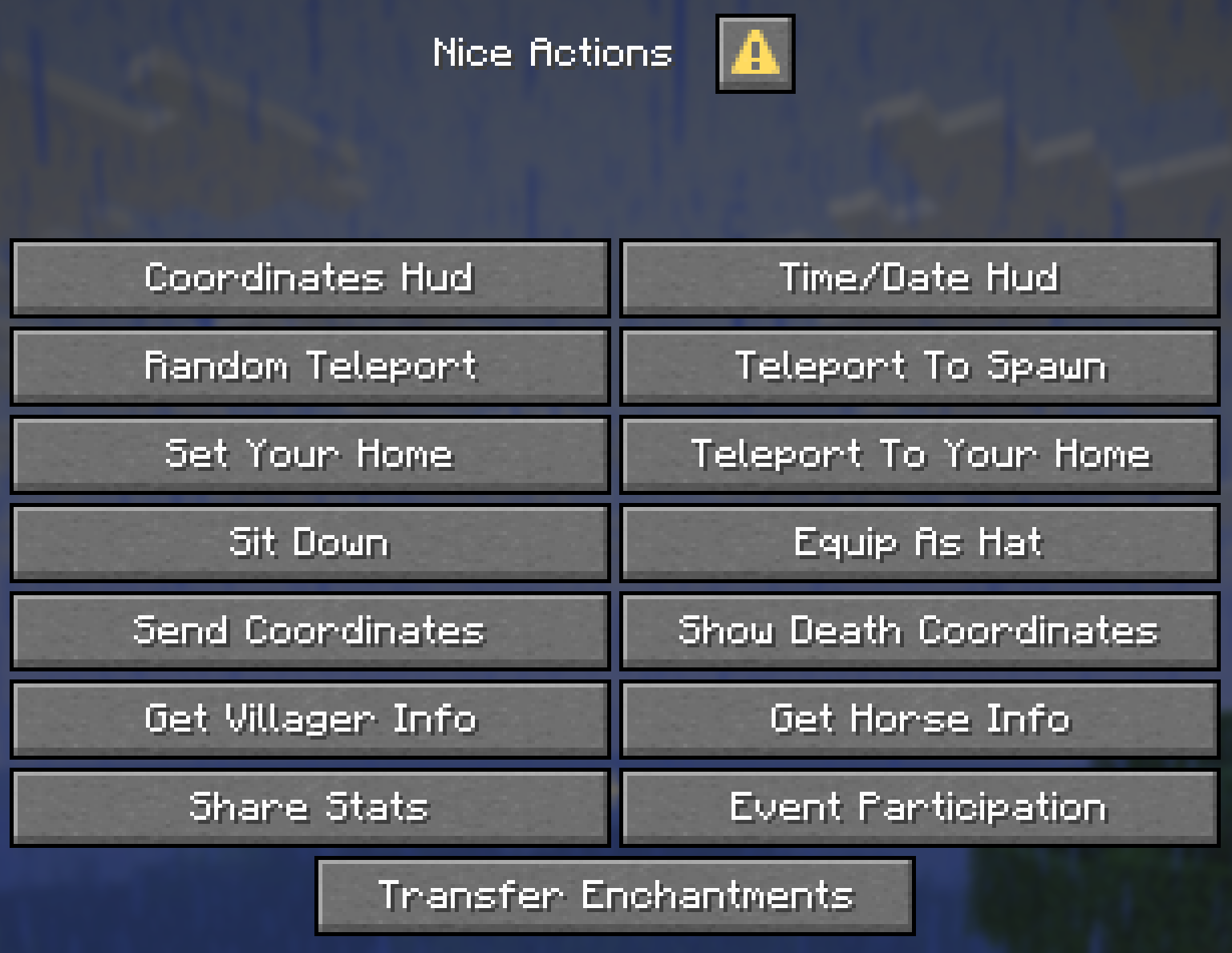
Nice Actions is a lightweight and user-friendly Minecraft data pack that adds an in-game menu for performing useful actions without typing commands. The menu can be opened using the new Quick Actions hotkey (default: G) and allows players to teleport, sit, manage and teleport to their home, toggle HUD elements, share statistics, join events and more. Administrators and operators can easily configure the available features directly in-game through the configuration menu.
¶ Download
The data pack is currently published only on Modrinth. All required assets are included in the data pack and can also be used as a resource pack. An automatically converted mod version is also available. You can download it here: Nice Actions on Modrinth
The resource pack is required for the HUD icons and other textures. When using the mod version in singleplayer worlds, the data pack does not need to be loaded as a resource pack. However, when using the mod version on a server, you must either include the assets from the data pack in your server's resource pack or instruct players to install the mod locally.
¶ Quick Actions Menu
Press G to open the Quick Actions menu. The Quick Actions key is a vanilla key binding and can be changed in the Controls settings. Each action may cost Experience Levels, depending on the settings of the server.
| Action | Default Cost | Description |
|---|---|---|
| Coordinates HUD | – | Shows your coordinates, facing direction and light level. |
| Time / Date HUD | – | Shows the date, time, weather and sleeping players. |
| Random Teleport | 30 Levels | Teleports you to a random location. |
| Teleport To Spawn | 5 Levels | Teleports you to the server spawn. |
| Set Your Home | 1 Level | Saves your current position as your home. |
| Teleport To Your Home | 3 Levels | Teleports you to your home. |
| Teleport Back | 3 Levels | Teleports you back to where you were before your last teleport. |
| Sit Down | – | Sit down on the spot. |
| Equip As Hat | – | Puts the held item on your head. |
| Send Coordinates | – | Shares your coordinates in chat. |
| Show Death Coordinates | 5 Levels | Shows where you last died. |
| Get Villager Info | 1 Level | Shows information about the nearest Villager. |
| Get Horse Info | 1 Level | Shows information about the nearest Horse. |
| Share Stats | 1 Level | Shares one of your statistics with nearby players. |
| Event Participation | – | Join or leave Events. |
| Transfer Enchantments | 30 Levels | Moves enchantments from one item to another. |
Every action is described in detail on the Actions page.
¶ Pages
| Page | Description |
|---|---|
| Actions | Every action of the Quick Actions menu in detail. |
| Events | Server-wide events with rewards and a leaderboard. |
| Administration | The configuration menu for admins. |
¶ Advancements
Nice Actions adds the following advancements to the Explorer's Eden advancement tab:
| Advancement | Description | Type |
|---|---|---|
| Menu Master | Open the Nice Actions menu for the first time. | Task |
| Know Your Place | Open the coordinates HUD for the first time. | Task |
| Keeping Time | Open the custom Time/Date HUD for the first time. | Task |
| Take a Seat | Sit down for the first time. | Task |
| Random Wanderer | Use Random Teleport for the first time. | Task |
| Homeward Bound | Teleport to spawn using the Spawn teleport feature. | Task |
| Home Sweet Home | Set your first home, then teleport to it. | Goal |
| Grim Reminder | Check your death coordinates after dying. | Task |
| Broadcast | Send your coordinates to chat. | Task |
| Meet the Neighbors | Use the Villager Info inspector on a villager. | Task |
| Horse Whisperer | Use the Horse Info inspector on a horse. | Task |
| Comparing Notes | Share your stats with another nearby player. | Task |
| Enchantment Exchange | Use the Transfer Enchantments feature to move an enchantment between items. | Task |
| Bonehead | Equip a bone as a hat. | Task |
| Feather in Your Cap | Equip a feather as a hat. | Task |
| Glass Half Full | Equip a glass block, any color, as a hat. | Task |
| Shocking Style | Equip a lightning rod as a hat. | Task |
| Jack of All Trades | Complete at least one daily event from each category. | Goal |
| Angler's Almanac | Complete the fishing daily event for every fish type. | Goal |
| Weapon Master | Complete the killing daily event with every weapon category. | Goal |